The set at a glance
The strip shows each song's length with the overlaps drawn where they will be. Drag the next song over the one before to set the crossfade by eye.
Song into song without a gap — crossfades on the bar, the next song at the tempo and key of the last, a fader under your hand.
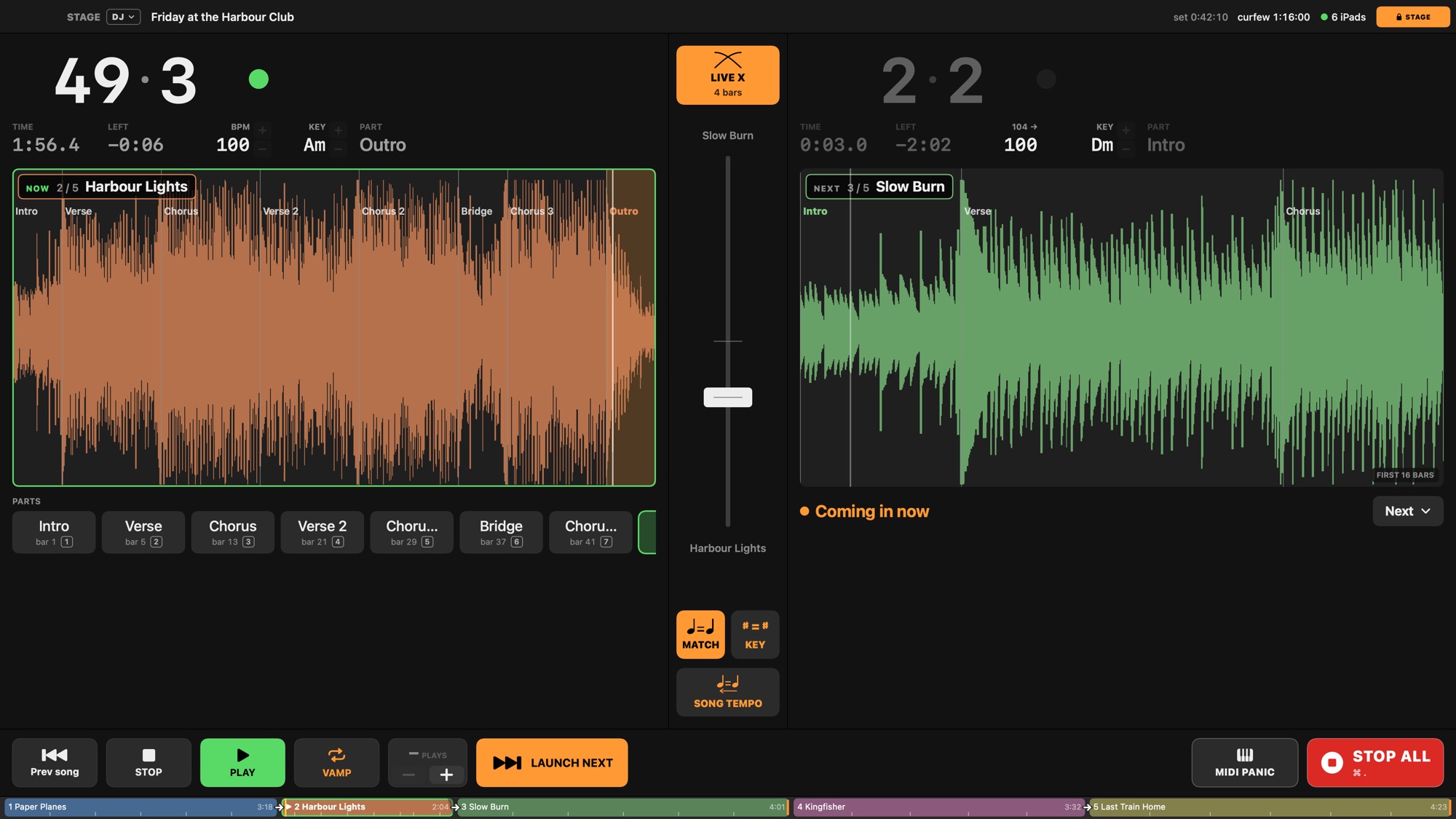
A set where the music never stops, played from stems: each song crossfades into the next on a bar line, and the band — if there is one — reads the right chart through the whole mix. Choose the DJ layout (View ▸ Layouts) and the stage page becomes two decks with a fader between them.
On the setlist, a song chained into the next gets a crossfade — so many bars or beats before its end, or from one of its parts. The next song starts on that bar line with no count-in, and this one fades out under it.
Crossfade Setlist ▸ Crossfade — On a song that goes on into another: the next song starts that many bars or beats before this song's end — or where the part you pick starts — with no count-in, and this song fades out to its end under it. None is the gapless cut. Also the length a live launch (Next Song while playing) into that song crossfades over. On one of several selected songs: every selected song.
Match Tempo Setlist ▸ Match Tempo — On a song that goes on into another: the next song, reached from this one, plays at this song's tempo at its end; started on its own it plays at its own. On one of several selected songs: every selected song. From the Setlist menu: the selected songs, else the song shown.
Back to Song Tempo Setlist ▸ Back to Song Tempo — With Match tempo on: once the crossfade into the next song is over (from its first bar without one), the next song goes from the matched tempo back to its own over 2, 4, 8, 16 or 32 bars — a steady ramp, the stems following it, never a jump. Off: it stays at the matched tempo. Choosing a length switches Match tempo on. On one of several selected songs: every selected song.
Match Key Setlist ▸ Match Key — The song this one goes on into is moved to this song's key as it plays — the nearest way, up to six semitones; a relative major or minor counts as the same key. Both songs need their key set (Song inspector ▸ Key). Decided when the next song is reached; it plays transposed, its charts and the iPads with it. The DJ page's ♯ = ♯.

The strip shows each song's length with the overlaps drawn where they will be. Drag the next song over the one before to set the crossfade by eye.
Live Crossfade — On: Next Song, Go to Song, a setlist row's ▶ or a part of another song pressed while a song plays starts the other song on the next Quantize line and fades this one out under it over Live X's length (Show Settings › Live) — the song's own crossfade into that very song wins. Off: such a launch cuts, as a jump does. A jump to a part of the song playing never crossfades. Kept with the show.
Nudge Tempo Up Transport ▸ Nudge Tempo Up — The song playing goes 1 BPM faster from its next beat line — a DJ's pitch fader without the pitch: the stems are stretched live (good, not a prepared render's quality), the click, the LCD, sync out and the iPads follow. Presses before the beat arrives add up. The DJ page's + does it, ⇧ for 0.1 BPM. Lasts until the song stops; Back to Song Tempo Now drifts back to the song's own tempo.
Key Up Transport ▸ Key Up — The song playing goes a semitone up from its next beat line — the stems stretched live at the new pitch (good, not a prepared render's quality); drums, percussion, click and guide stay put, as Transpose leaves them. The chord charts, the DJ page and the iPads show the new key. Presses before the beat arrives add up. The DJ page's + beside KEY does it. When the song stops, the change stays in its Transpose (⌘Z takes it back). The next song's key is set on the NEXT deck.
Play Next — The DJ page's Next ▸: the song picked moves to right after the song playing, so it is the next one — Launch next (Next Song) starts it, a chain runs into it. One step of Undo. The setlist's order otherwise stays.
MIDI — a controller for the fader and the tempo · the audio — the outputs for the house and a cue.
A band playing over the tracks, every part on its own screen through the mix: Live over DJ.